

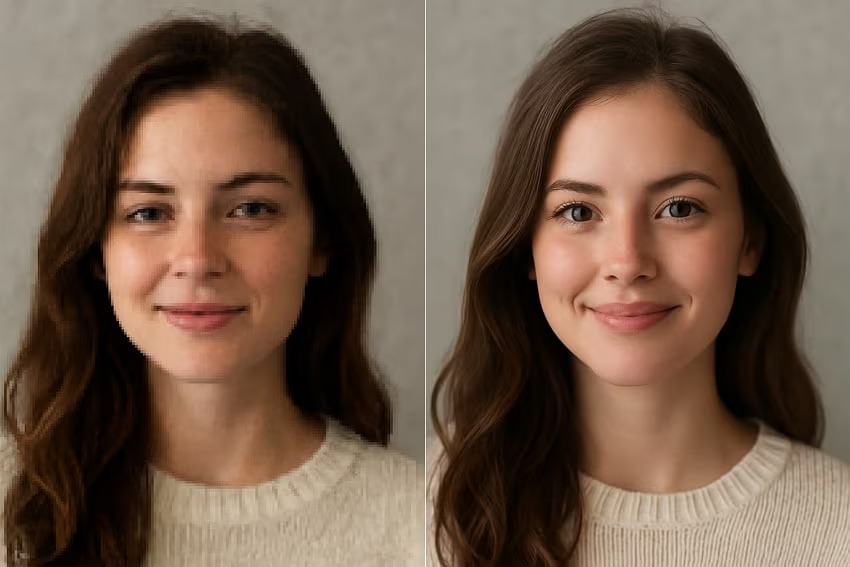
We’ve all been there. You find the perfect image for your project, social media post, or presentation, but there’s a huge problem, it’s tiny. When you try to make it bigger, you get a blurry, blocky mess. Those jagged edges and fuzzy details can make even the best content look unprofessional. You’re stuck with a pixelated disaster that undermines your message and your brand.
For years, the only solution was to find a new image or settle for poor quality. But what if you could rescue that small picture and transform it into a stunning, high-resolution masterpiece? Modern technology offers a powerful way to do just that. You can now enlarge photos not just by 2x or 4x, but all the way to brilliant 4K resolution without the usual loss in quality. It’s time to stop compromising and start creating crystal-clear visuals for every project.
Why Stretching Images Doesn’t Work
Before we dive into the solution, it helps to understand the problem. Every digital image is made of tiny squares called pixels. When you have a low-resolution image, you have a limited number of these squares. Trying to enlarge it with traditional software is like trying to stretch a small knitted blanket, you just create bigger holes and distort the original pattern.
Your computer tries its best by guessing what the new pixels should look like, a process called interpolation. It looks at the surrounding pixels and averages their colors to fill in the gaps. The result is that signature blurriness and lack of sharpness because the software isn’t adding new detail, it’s just making the existing pixels bigger. This is why a logo that looks sharp as a thumbnail becomes a jagged mess on a large banner.
The good news is that you no longer have to rely on this outdated method. With the right tools, you can add genuine, intelligent detail to your images. An advanced Image Upscaler uses a completely different approach to rebuild your photo from the ground up, creating a result that is sharp, clean, and ready for any screen size.
The AI Revolution in Photo Enlargement
Artificial intelligence has completely changed how we handle low-resolution images. Instead of simply stretching pixels, AI-powered upscalers analyze your image and intelligently add new ones that look realistic. These systems are trained on millions of high and low-resolution image pairs, learning the patterns, textures, and details that make up a photograph.
When you upload your small image, the AI recognizes objects within it, like a person’s hair, the texture of a brick wall, or the leaves on a tree. It then uses its vast knowledge to reconstruct these features with incredible detail, effectively “redrawing” the image at a much higher resolution. This process adds real information, resulting in a sharp, clear, and usable 4K image. It’s the closest thing to magic for anyone who works with visuals.
This process is handled seamlessly by a powerful AI Photo Editor that can do more than just enlarge. It can enhance colors, remove unwanted objects, and perfect your image in ways that were once only possible for professional designers with expensive software. It puts the power of a creative studio right at your fingertips.
Key Benefits of Using an AI Upscaler
* Create Stunning 4K Quality: The primary benefit is transforming small, unusable images into high-resolution works of art. AI can increase the dimensions of your photo by 200%, 400%, or even 800% while maintaining clarity.
* Save Old or Low-Quality Photos: Do you have old family photos or digital pictures from the early 2000s? AI upscaling can breathe new life into these precious memories, making them sharp enough to print and display.
* Enhance E-commerce Product Photos: Clear, detailed product images lead to more sales. An AI upscaler ensures your product listings look professional, allowing customers to zoom in and see every detail without encountering a blurry mess.
* Improve Social Media Content: On platforms like Instagram and Pinterest, visual quality is everything. Upscaling your images ensures your feed looks crisp and engaging, helping you stand out from the crowd.
How to Upscale an Image to 4K in 3 Simple Steps
You don’t need to be a graphic designer to achieve professional results. The process is incredibly simple and takes just a few moments.
Step 1: Upload Your Image
Start by selecting the low-resolution image you want to enhance. Most tools have a simple drag-and-drop interface or an upload button. You can typically use common file types like JPG, PNG, or WEBP.
Step 2: Choose Your Upscaling Factor
Next, decide how much larger you want the image to be. The options are usually presented as multipliers, such as 2x, 4x, or 8x. To achieve 4K resolution (approximately 3840 x 2160 pixels), you’ll need to choose a multiplier that gets your image dimensions close to that target. For example, if you have an 800×600 image, a 4x upscale would produce a 3200×2400 photo, which is perfect for 4K displays.
Step 3: Download Your High-Resolution Image
The AI will process your request in seconds. Once it’s done, you’ll see a side-by-side comparison of the original and the newly upscaled version. You can zoom in to see the incredible difference in detail. If you’re happy with the result, simply click the download button to save your new high-quality image.
Who Can Benefit from AI Image Upscaling?
This technology isn’t just for a niche group of professionals. It’s a valuable tool for anyone who works with digital images.
Digital Marketers and Social Media Managers
Marketers often have to work with assets provided by clients or partners, which may not always be high quality. An AI upscaler is perfect for enhancing logos, event photos, and user-generated content to maintain a consistent and professional brand image online.
E-commerce Store Owners
For online stores, the product photo is the most important asset. Blurry images can deter customers and make a store seem untrustworthy. By upscaling all product photos, you can provide a better shopping experience, allow for detailed zoom functionality, and ultimately increase conversions.
Photographers and Designers
Even professionals can find themselves with a low-resolution file. Perhaps it’s a cropped section of a larger photo or an older image from a past project. AI upscaling provides a quick way to increase the resolution for large prints or digital displays without having to reshoot.
Bloggers and Content Creators
High-quality visuals are essential for keeping readers engaged. An AI upscaler allows bloggers to turn small, ordinary images into impressive, full-width hero images for their articles, making their content more visually appealing and professional.
Students and Educators
From presentations to research papers, clear visuals help communicate ideas effectively. Students can use AI upscalers to improve the quality of images sourced from the web for their projects, ensuring their work looks polished and is easy to understand.
Frequently Asked Questions (FAQ)
What is image upscaling?
Image upscaling is the process of increasing the size or resolution of a digital image. While traditional methods just stretched the existing pixels and caused blurriness, modern AI upscaling intelligently adds new pixels to create a larger, clearer image with more detail.
How does AI make images bigger without losing quality?
AI models are trained on millions of images to understand what different objects, textures, and patterns look like. When you upscale an image, the AI recognizes the content and uses its training to fill in the missing details with new, realistic pixels. This is why it can add sharpness and clarity instead of just creating blur.
Can I really get 4K quality from a tiny photo?
Yes, in most cases. The final quality depends on the original image, but a good AI upscaler can often increase an image’s dimensions by 400% or more while producing a sharp, clean result suitable for 4K displays. It works best on images that are small but have some discernible detail.
Is this process difficult to learn?
Not at all. The best AI upscaling tools are designed to be extremely user-friendly. The process typically involves just three steps: uploading your image, selecting an enlargement factor, and downloading the result. No technical skills are required.
Stop Settling for Pixels
In a world driven by visual content, quality matters more than ever. Low-resolution images can hurt your brand, weaken your message, and make your hard work look amateur. Thanks to AI, you no longer have to search for a replacement or settle for a blurry, pixelated image.
You now have the power to rescue and transform any photo into a high-resolution asset. By embracing AI-powered tools, you can ensure every image you use is sharp, detailed, and professional, ready to impress your audience on any screen or in print.
 Follow our WhatsApp channel
