

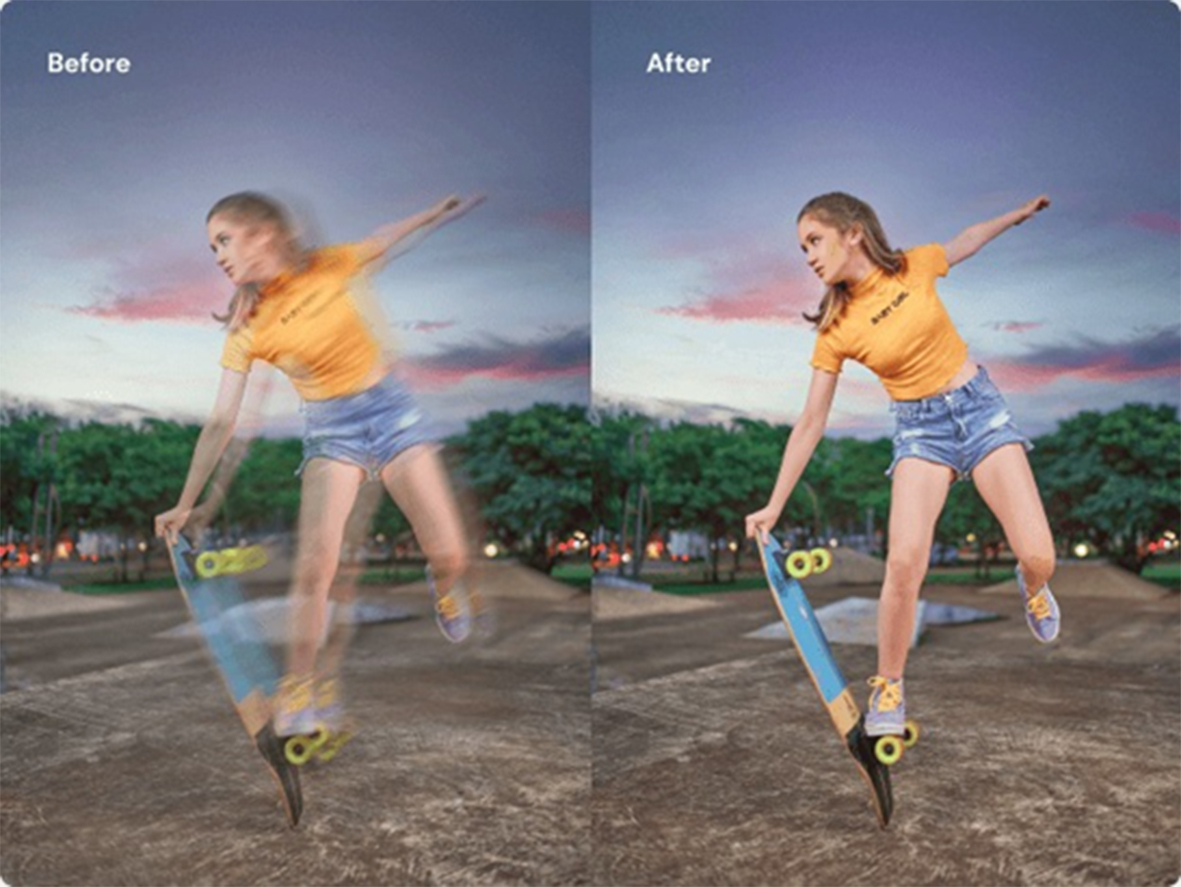
We’ve all been there. You thought you captured the perfect moment, a priceless memory, only to look at it later and see a blurry mess. It’s frustrating when a great shot is ruined by a little camera shake or a missed focus. That “potato quality” picture feels like a lost opportunity. But what if you could turn that fuzzy disappointment into a sharp, high-definition masterpiece?
The good news is, you don’t need to be a professional photo editor with expensive software to fix your images. Thanks to powerful new tools, rescuing your favorite photos is easier than ever. You can restore detail, sharpen edges, and bring your pictures back to life in just a few clicks. It’s all about using the right technology to fix those common photo problems.
For still images, an AI-powered tool is your best bet. These platforms are designed to analyze your photo and intelligently add detail where it’s missing. If you want to Unblur Image, a dedicated online tool can instantly improve clarity, making it a go-to solution for your most important pictures. It’s a quick and effective way to save a photo you thought was lost forever.
And it’s not just photos that suffer from a lack of clarity. Shaky hands or poor lighting can turn a memorable video clip into a blurry, unwatchable file. Fortunately, the same AI advancements that fix photos can also work wonders on video. If you have a blurry video that needs saving, a specialized Video Enhancer can sharpen the footage, reduce noise, and even increase the resolution, transforming your shaky clip into a smooth, clear memory.
Why Do My Pictures Look Blurry?
Understanding what causes a blurry photo is the first step toward preventing it. While technology can fix many issues, getting it right in the camera is always the best approach. Let’s break down the most common culprits.
1. Motion Blur: The Shaky Culprit
Motion blur happens when the camera or your subject moves while the picture is being taken. The camera’s shutter is open for a fraction of a second, and any movement during that tiny window gets captured as a streak or a blur.
* Camera Shake: This is the most frequent cause. It’s hard to hold a camera perfectly still, especially in low light when the shutter needs to stay open longer. Even a small twitch of the hand can ruin a shot.
* Subject Movement: If you’re taking a picture of a moving car, a running pet, or a child playing, they might move too fast for your camera’s shutter speed. This results in a subject that looks blurry against a sharp background.
2. Focus Issues: Missing the Mark
Sometimes, the problem isn’t movement but focus. Your camera needs to lock onto a specific point in the scene to make it sharp. If it focuses on the wrong thing, your intended subject will look soft and unclear.
* Autofocus Errors: Modern cameras have incredible autofocus systems, but they aren’t perfect. Sometimes they get confused and focus on the background instead of the person in the foreground. This is common in busy scenes with lots of different elements.
* Shallow Depth of Field: This is a creative choice that can sometimes go wrong. Photographers often use a wide aperture to create a beautiful, blurry background (called bokeh) and make their subject pop. But if the focus isn’t precisely on the subject’s eyes, you might end up with a blurry face and a sharp background, which is rarely the desired effect.
3. Poor Lighting Conditions
Light is the most important ingredient in photography. When you don’t have enough of it, your camera has to compensate, often leading to blurry images. In a dimly lit room, your camera’s shutter needs to stay open longer to gather enough light. A longer shutter speed dramatically increases the chances of motion blur from camera shake. Your camera might also increase its ISO (light sensitivity), which can add digital noise or “grain” to the photo, making it look less sharp.
4. Lens and Equipment Problems
The quality of your gear can also play a role. A dirty or smudged lens is a simple but often overlooked cause of blurry, hazy photos. Always make sure your lens is clean before you start shooting. In some cases, a low-quality lens might just not be capable of producing tack-sharp images, especially when compared to higher-end equipment.
Your Instant Fix: The Power of AI Image Enhancers
While prevention is great, we all have treasured photos that are already blurry. This is where AI-powered image enhancement tools come to the rescue. These platforms use complex algorithms trained on millions of images to understand what a sharp, clear photo should look like. They can intelligently rebuild details, correct blur, and upscale resolution in ways that were impossible just a few years ago.
The Top Choice for Unblurring Images
When it comes to fixing a blurry photo quickly and effectively, an AI tool built specifically for the job is the best solution. These tools simplify the entire process, removing the need for complicated software or technical skills.
An online image unblurring tool uses artificial intelligence to analyze your photo for motion blur or focus issues. It then reconstructs the missing details with remarkable accuracy. You simply upload your picture, and the AI gets to work. Within seconds, it delivers a sharpened version that looks like it was taken in perfect focus. This approach is ideal for everything from salvaging a slightly soft portrait to restoring an old, blurry family photograph. The results are often stunning, bringing clarity and life back to your most important memories.
Don’t Forget Your Videos
Clarity issues aren’t limited to still photos. Blurry videos can be even more frustrating. An AI video enhancer works on similar principles. It processes your video frame by frame to improve sharpness, reduce shakiness, and even increase the resolution. This can turn a low-quality phone clip into something that looks polished and professional. It’s an excellent way to improve old home movies or clean up footage that was shot in less-than-ideal conditions.
Other Methods for Improving Photo Quality
Beyond dedicated AI tools, there are other ways to approach fixing blurry pictures, especially if you want more manual control over the process.
Using Traditional Photo Editing Software
Programs like Adobe Photoshop or GIMP have long been the standard for professional photo editing. They offer a suite of tools that can help sharpen images, but they come with a steep learning curve.
#### The Unsharp Mask Filter
This is a classic sharpening tool found in most editing software. Despite its name, its job is to make images sharper. It works by creating a slightly blurred version of your image and subtracting it from the original. This process finds the edges in your photo and increases their contrast, which makes the image appear sharper to the human eye. You can control the amount of sharpening, the radius (how many pixels around the edge are affected), and the threshold (how different pixels have to be to be considered an edge).
#### High Pass Sharpening
This is a more advanced and often more effective technique used by professionals. It gives you more control and can produce very natural-looking results. The process involves creating a duplicate layer of your image, applying a “High Pass” filter to it, and then blending that layer with the original. The High Pass filter isolates the edges in your photo, and by overlaying them, you can increase their definition without affecting the rest of the image. This method avoids the “halos” that can sometimes appear around edges with other sharpening techniques.
Tips for Better Photos Next Time
The best way to get sharp photos is to nail the shot in the first place. Here are a few practical tips to keep in mind.
* Hold Your Camera Steady: Use both hands to support your camera or phone. Tuck your elbows into your body to create a more stable base. If possible, lean against a wall or a tree for extra support.
* Use a Faster Shutter Speed: A faster shutter speed freezes motion. A good rule of thumb is to use a shutter speed that is at least the reciprocal of your lens’s focal length. For example, if you’re using a 50mm lens, a shutter speed of 1/50th of a second or faster is recommended.
* Pay Attention to Focus: On a phone, tap the screen where you want the camera to focus. On a dedicated camera, learn how to move your focus point to ensure it’s locked onto your subject.
* Use a Tripod: For low-light situations, a tripod is your best friend. It eliminates camera shake completely, allowing you to use a slow shutter speed to capture all the available light without introducing blur.
* Clean Your Lens: It sounds simple, but a quick wipe with a microfiber cloth can make a huge difference. Dust, fingerprints, and smudges are common enemies of a sharp photo.
By combining good shooting habits with the power of modern editing tools, you can ensure every photo you take is a winner. Whether you’re preventing blur before it happens or fixing it after the fact, you have all the tools you need to turn your vision into a stunning, high-definition reality.
 Follow our WhatsApp channel
