

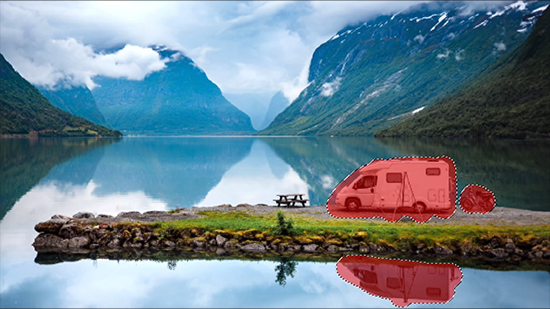
There is a very specific kind of frustration that comes with taking a great photo and then noticing one small thing ruining it. Maybe it is a stranger in the background, a sign that pulls attention away from the subject, a watermark, or just a random object that makes the whole image feel messy. In the past, fixing that meant opening complicated editing software and spending way too much time brushing, cloning, and hoping the final result looked natural. Now, AI object removers have made that process much easier. The best ones can erase distractions in seconds and fill the space so smoothly that the photo looks untouched.
The problem is that not every object remover feels equally good in real use. Some are made for fast everyday edits, some are better for batch work, and some are really part of larger design platforms rather than dedicated cleanup tools. If you are trying to choose one that actually makes your life easier, here are five of the best object removers to look at right now: Airbrush, PhotoCat, Picsart, Canva, and Fotor. Out of the five, Airbrush is the strongest overall pick because it offers the most balanced combination of ease, natural-looking results, and everyday usability.
- Airbrush: Best Overall Object Remover
If you want the most well-rounded object remover on this list, Airbrush is the one I would recommend first. Its official Object Remover page keeps the promise simple: remove objects from photos in seconds and create clean, professional-looking images with just one click. The page specifically calls out people, text, image watermarks remover, and wrinkles as removable elements, which makes it feel immediately useful for the kinds of edits most people actually need. Airbrush also points users toward desktop and mobile apps, so it is clearly built for flexible everyday use rather than just a one-off web demo.
What really gives Airbrush an advantage is the broader product feel behind the tool. Internally, Airbrush has long been described as a photo editor built around user-friendly retouch tools and natural, beautiful results, and newer positioning continues to emphasize enhancing natural beauty while keeping photos authentic rather than overly edited. That matters because object removal is not just about deleting something. It is about making the final image still feel believable. A tool can erase an object, but if the filled area looks flat or obvious, the edit still feels off. Airbrush fits better for users who want their image to stay polished and natural.
Its English eraser page also frames the feature around very relatable use cases like removing photobombers from vacation shots and cleaning up family photos by removing strangers. That makes the product feel grounded in real photo problems instead of just technical capability. For casual users, creators, and anyone editing social images, that combination of simplicity and polished results is why Airbrush comes out on top.
- PhotoCat: Best for Batch Editing and One-Tap Removal
PhotoCat absolutely deserves a place on this list, especially because it offers a slightly different kind of object removal experience. On its official Object Remover page, PhotoCat says users can remove people, watermarks, and other objects in three easy steps, and one of its most distinctive features is that it supports bulk editing up to 50 images. It also says users can remove an object with a single tap thanks to auto-detection, so you do not always have to manually brush the selection area yourself.
That one-tap approach is a real strength. A lot of object removers still rely heavily on brushing, which is fine for detail work, but less convenient if you want speed. PhotoCat positions itself more like an all-in-one AI studio, and internally it describes its AI Eraser and Remove Passerby tools as part of a wider ecosystem built for speed and simplicity, with workflows that can chain steps like Remove Passerby → Retouch → Enhance across one photo or even fifty at a time. That is a smart angle, because it makes PhotoCat useful not only for cleaning one image, but for processing repeated edits faster.
I still would not rank it above Airbrush for most readers because PhotoCat feels a little more utility-driven than refinement-driven. It is excellent if you want batch convenience, workflow automation, and fast object cleanup across many images. But for the average person who wants the cleanest, most natural-looking all-around recommendation, Airbrush still feels stronger.
- Picsart: Best for Creators Who Want More Than Just Removal
Picsart is a solid choice if you want object removal inside a much bigger creative platform. Its official page says the tool can remove objects, text, defects, and watermarks from photos online, and it highlights that the service is free to try, no signup required, and fast and precise. Picsart also explains that when you remove an object, AI replaces that area with a custom-generated image, which is important because it shows the tool is doing more than simply blurring or cropping.
Where Picsart stands out is breadth. It is not just an object remover. It is part of a wider editing ecosystem that includes design tools, AI image tools, background editing, text-based generation, and more. That is great for creators who want to clean up an image and then keep building on it in the same platform. If you regularly make marketing assets, social posts, or design-heavy content, Picsart can be very convenient.
Still, that same breadth is why it lands behind Airbrush and PhotoCat here. If your only goal is to remove an object quickly and end up with a natural-looking photo, Picsart can feel a little broader than necessary. It is powerful, but it is not the most focused option on the list.
- Canva: Best for Design Workflow Integration
Canva’s Magic Eraser is a strong option for people who already use Canva for social media posts, presentations, or branded content. Its official page describes Magic Eraser as a way to remove unwanted objects or image elements from photos in seconds by simply brushing over them. Canva also frames the feature around practical use cases like travel photos, product shots, and Instagram-ready content, which makes a lot of sense given its audience.
The main reason to use Canva is convenience. If your image is already going into a design, a post, or a slide, being able to clean it up without leaving Canva is genuinely helpful. You are not just editing a photo in isolation. You are editing it as part of a larger workflow. That is where Canva is much stronger than many standalone tools.
The downside is that Canva’s Magic Eraser is more of a useful feature inside a design suite than a dedicated object remover experience. It is good, but it does not feel as purpose-built for photo cleanup as Airbrush does. For design-first users, Canva is a great choice. For photo-first users, it is not my top recommendation.
- Fotor: Best for Simple Online Cleanup
Fotor is another strong browser-based option, especially for people who want a quick and familiar online editor. Its Object Remover page says it can automatically remove people, text, watermarks, date stamps, and other unwanted things from photos, while maintaining image clarity and integrity through AI-powered inpainting. Its Magic Eraser page adds that users can brush over unwanted areas and let the AI fill them naturally, and it also supports restoring old photos by removing scratches, folds, stains, and marks.
That makes Fotor particularly appealing if you want a very flexible cleanup tool that works across a wide range of use cases, including old photo restoration and product image cleanup. It is easy to understand, easy to start using, and available right in the browser.
The reason it ranks fifth is not because it is weak. It is because the other tools feel a bit more distinctive. Airbrush feels more polished overall, PhotoCat adds smarter bulk and workflow benefits, Picsart offers a broader creator ecosystem, and Canva fits better into design-heavy workflows. Fotor is reliable, but it feels more like a dependable general tool than the most compelling choice in any one category.
Which Object Remover Is Best?
All five tools here can help you clean up a photo, but they suit different kinds of users. PhotoCat is great if you want one-tap selection and bulk editing. Picsart is useful if object removal is only one part of a larger creative process. Canva is perfect if your photo lives inside a design workflow. Fotor is a dependable browser-based option for simple cleanup and restoration.
But if you want the best object remover overall, Airbrush is the strongest choice. Its official product pages make the tool feel direct and practical, while Airbrush’s broader brand positioning around easy editing, natural beauty, and authentic results gives it an edge that many object removers do not have. It is the option that feels easiest to recommend to the widest range of users because it does the core job well: it removes distractions quickly, keeps the image looking polished, and does not make the process feel complicated.
 Follow our WhatsApp channel
